Main problem
Deadlines drop out of sight
Recurring inspections and maintenance tasks live in spreadsheets, calendars or people's heads. Nobody reliably sees what is due next.

Maintenance and inspection management
Manage machines, devices and measuring equipment in one central place. Keep due dates in view, document evidence traceably and make clear who is responsible.
Typical problem
Inventory list here. Maintenance record there. Calendar entry with a colleague. Certificate on a shared drive. As long as nothing happens, it seems harmless. In an audit or during a failure, it becomes a problem.
Main problem
Recurring inspections and maintenance tasks live in spreadsheets, calendars or people's heads. Nobody reliably sees what is due next.
Inspection records, maintenance reports and documentation may exist, but later they cannot be found reliably.
Several people are involved. In the end, everyone assumes that someone else is taking care of it.
How it works in qmBase
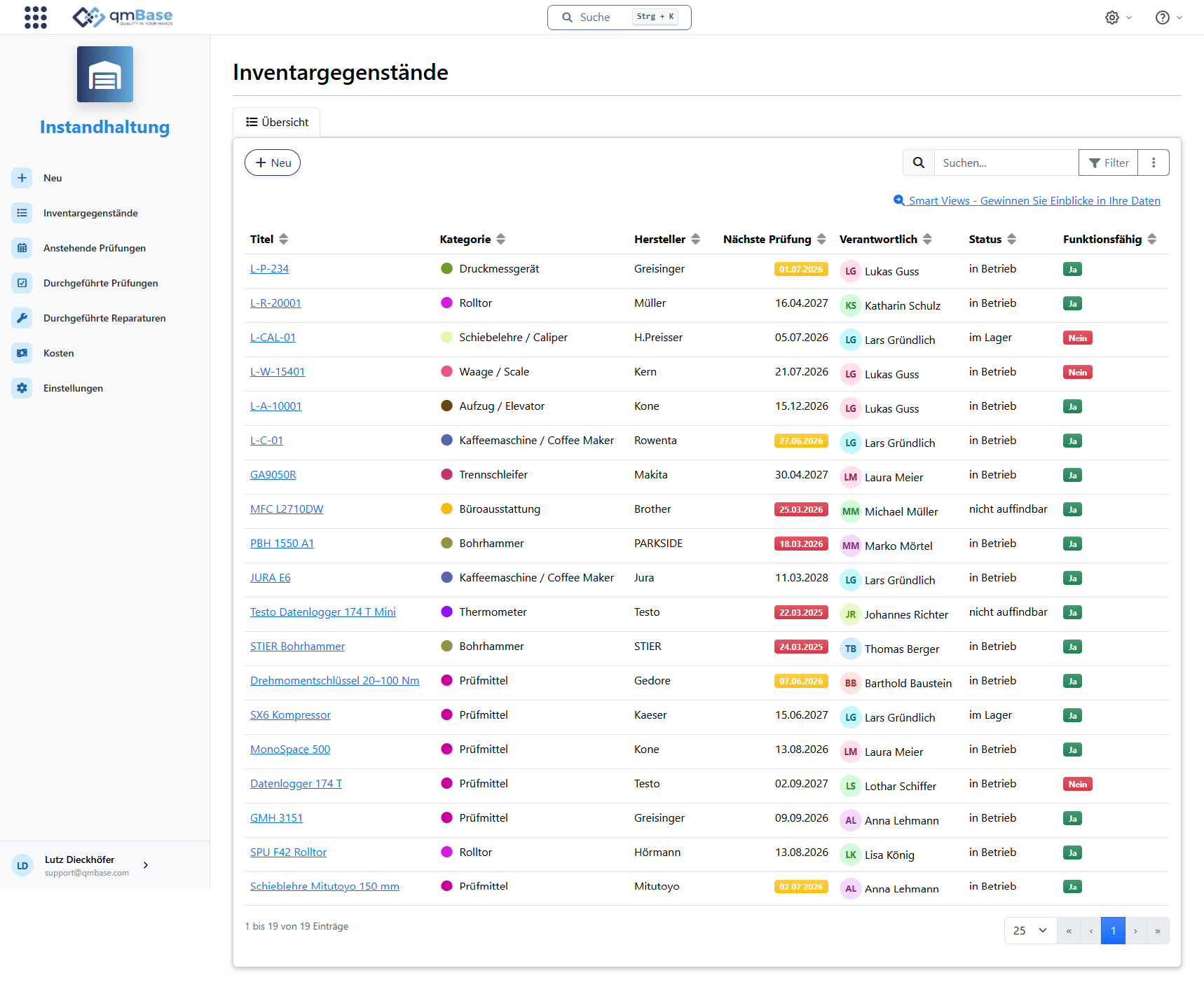
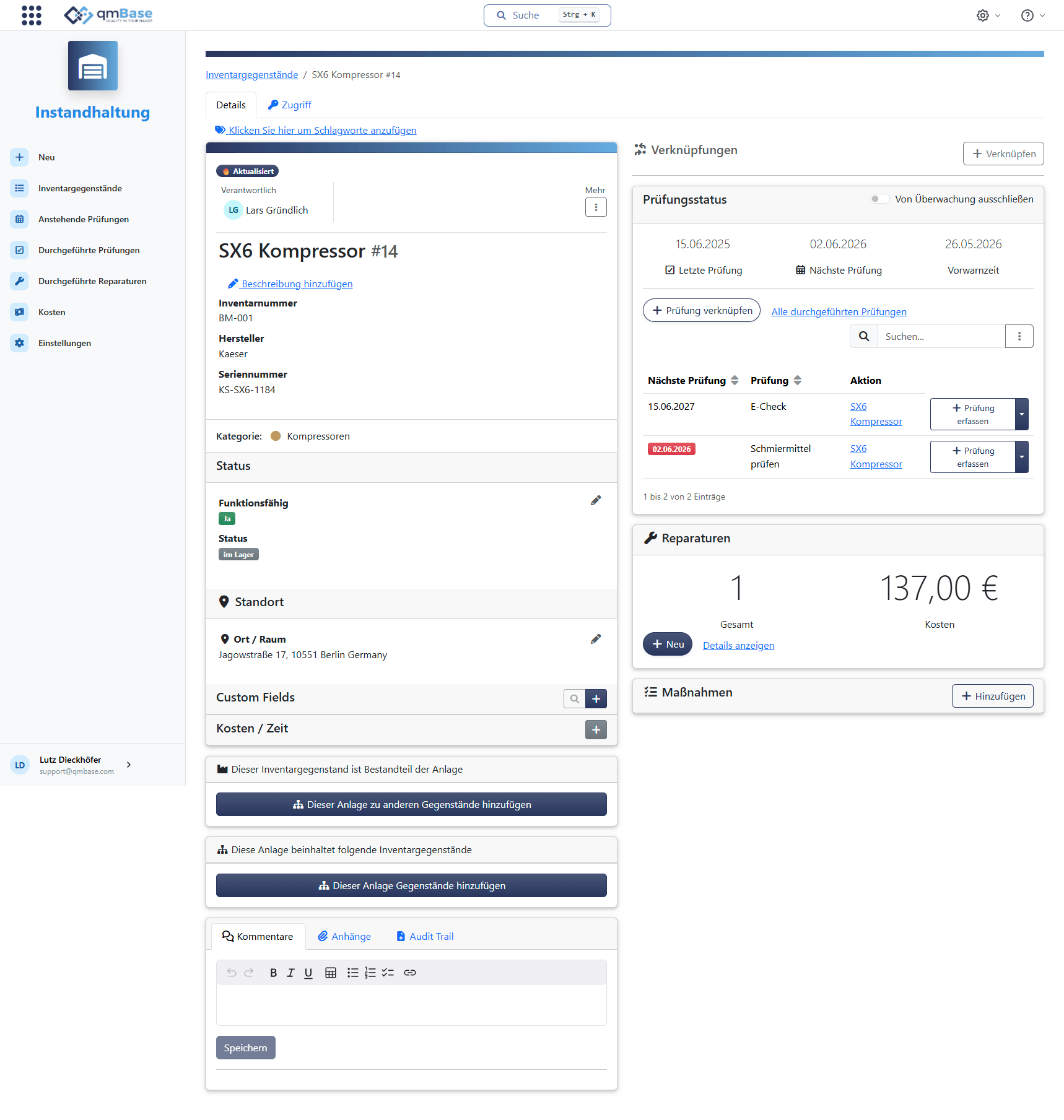
In qmBase, you capture machines, devices, measuring equipment and other assets in one central place. For every record, you can store owners, locations, inspection intervals, maintenance information, documents and evidence.
Inventory
Capture equipment centrally
Manage machines, devices, measuring equipment and assets in one central place.
Inspections
Monitor inspection dates
Plan maintenance, inspections and calibrations directly on the equipment record.
Responsibility
Make ownership visible
For every asset, it remains clear who is responsible.
Evidence
Document evidence
Link inspection records, certificates and reports directly.
Part of the QMS
A defective device can trigger an action. Measuring equipment can be linked to an inspection instruction. A supplier can be assigned to several assets. Information does not remain isolated, but becomes part of a traceable system.
Equipment is not just another list. Inspection instructions, owners, risks and actions remain connected where they are needed.
When an audit asks for an inspection record, evidence does not have to be searched for in folders, emails or old lists.
Equipment
Keep inspection dates in view
qmBase shows upcoming inspections not only as a date on the equipment record. You see what is overdue, what is due this week and which inspections need to be prepared this month or quarter.
Overdue and soon-due inspections are shown separately instead of disappearing in a long inventory list.
From the overview, you can document completion directly, including result and evidence.
Upcoming inspections
4
1
3
3
| Next inspection | Asset | Inspection | Action |
|---|---|---|---|
| 12 days ago | Testo 174 T Mini data logger | Calibration | Record inspection |
| 3 days ago | STIER rotary hammer | Electrical safety inspection | Record inspection |
| Today | PBH 1550 A1 | Safety inspection | Record inspection |
| In 5 days | Torque wrench 20-100 Nm | Calibration | Record inspection |
| In 3 weeks | L-C-01 | Electrical check | Record inspection |
| In 2 months | Mitutoyo caliper 150 mm | Calibration | Record inspection |
Evidence on the equipment record
Inspection
Calibration torque wrench
Last inspection
Today
Next inspection
in 12 months
Performed by
Lars Grundlich
Inspection recorded successfully
Drop or select a file here
calibration-certificate-DMS.pdf
Uploaded and linked to the equipment record
Traceability
Inspection records, maintenance reports, calibration certificates and operating instructions should not disappear somewhere in folder structures. In qmBase, relevant documents can be linked directly to the respective equipment record.
Store results and documentation directly on the equipment record.
Link calibration certificates, test reports or external evidence directly to the asset.
Document completed maintenance so that years later it is still clear what was done and when.
Collaboration
Maintenance only works when it is clear who is taking care of it. In qmBase, responsibilities are visible directly on the inspection date. Automatic notifications make due inspections visible before deadlines are already missed.
For every inspection date, it is visible who is responsible and which status applies.
Automatic notifications remind teams in time before inspections become overdue.
Task flow
From due date to documented evidence
Inspection
Safety inspection
Due date
in 5 days
Owner
M. Schneider
Date
today
Stored evidence
inspection_certificate_DM-42.pdf
Manage equipment, inspection dates and evidence centrally in one place. qmBase reminds teams in time and makes ownership visible.