Foundation
Consistent data structure
All apps use the same structure and operating principles for maximum consistency. Once learned, the same logic can be applied everywhere.

Integrated Quality Management System
qmBase connects information from specialized QM apps into one shared quality management system. This makes relationships visible where they matter.
Core principles
qmBase stores not only information, but also the relationships between it. This keeps processes traceable, shows what triggered what, and makes reusable information visible.
Foundation
All apps use the same structure and operating principles for maximum consistency. Once learned, the same logic can be applied everywhere.
Connections
Information can also be connected across apps. This preserves relationships and the important context behind each piece of information.
Findability
Each piece of information can be found by standard, location, department, process, or product without storing it multiple times.
Collaboration
Tasks, deadlines, and evidence remain assigned to people. This makes collaboration binding.
Transparency
Changes remain documented with ownership, timing, and context, so decisions and evidence stay easy to understand later.
The most important qmBase functions at a glance
From documents and audits to training, risks and objectives: qmBase brings your most important quality management tasks together in one place.
01 Documents & processes
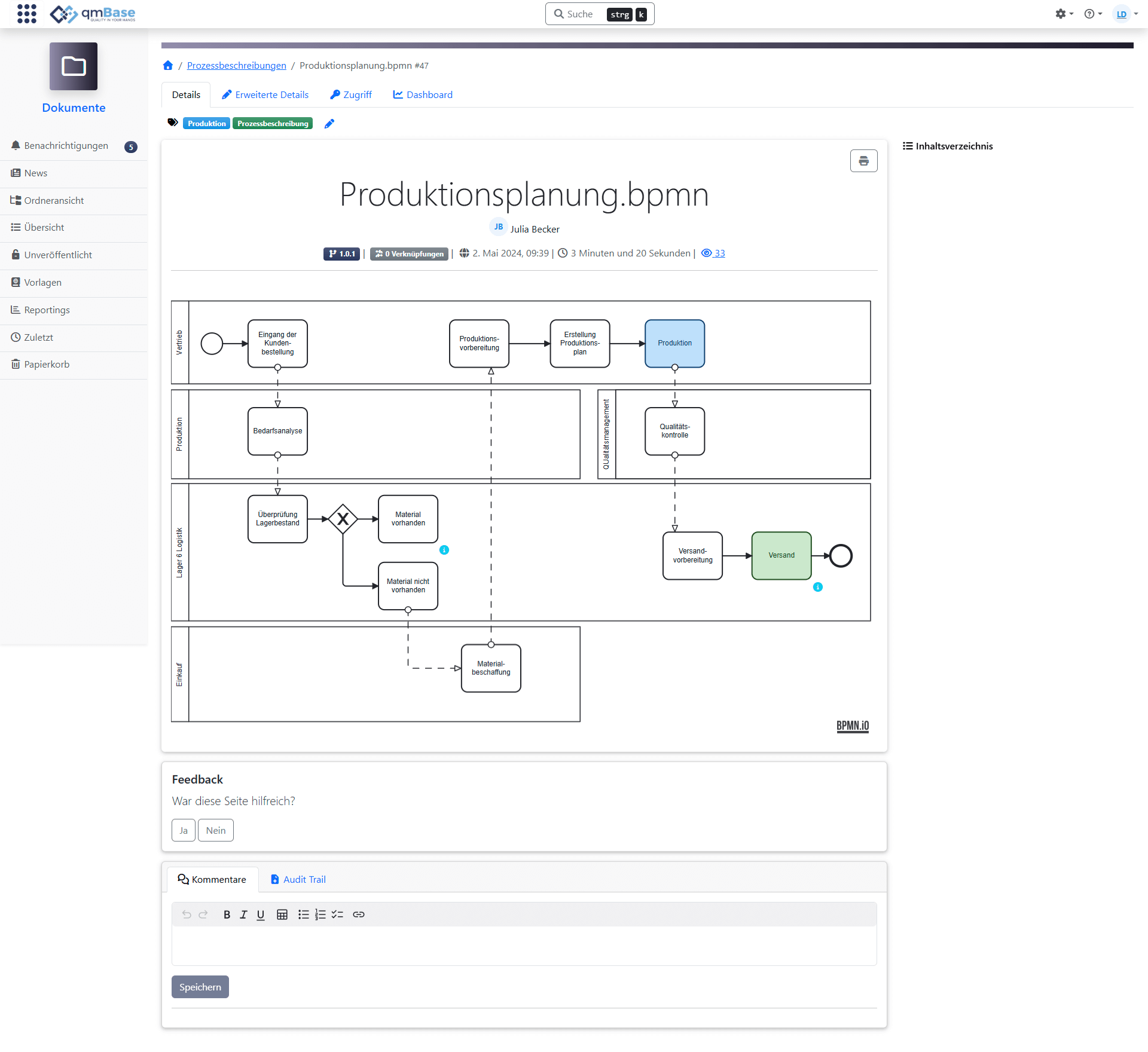
Procedures, audit reports and process descriptions or process maps: With qmBase, you create and edit your content directly in the system – including Word documents.
Approvals, versioning and version comparisons keep documents current and make every change traceable.
The right format for every item. Every change under control.
Quotation preparation
1. Requirements analysis: Clarify customer requirements, check feasibility and identify required resources.
1. Requirements analysis: Clarify customer requirements, check the available budget, check feasibility and identify required resources.
2. Calculation: Determine unit prices, quantities and total amount.
3. Document creation: Create the quotation with all mandatory information.
4. Review and approval: Four-eyes principle for complex projects.
4. Review and approval: Four-eyes principle for quotations above €10,000 and complex projects.
5. Dispatch: Send the approved quotation to the customer.
02 Audits, complaints & actions
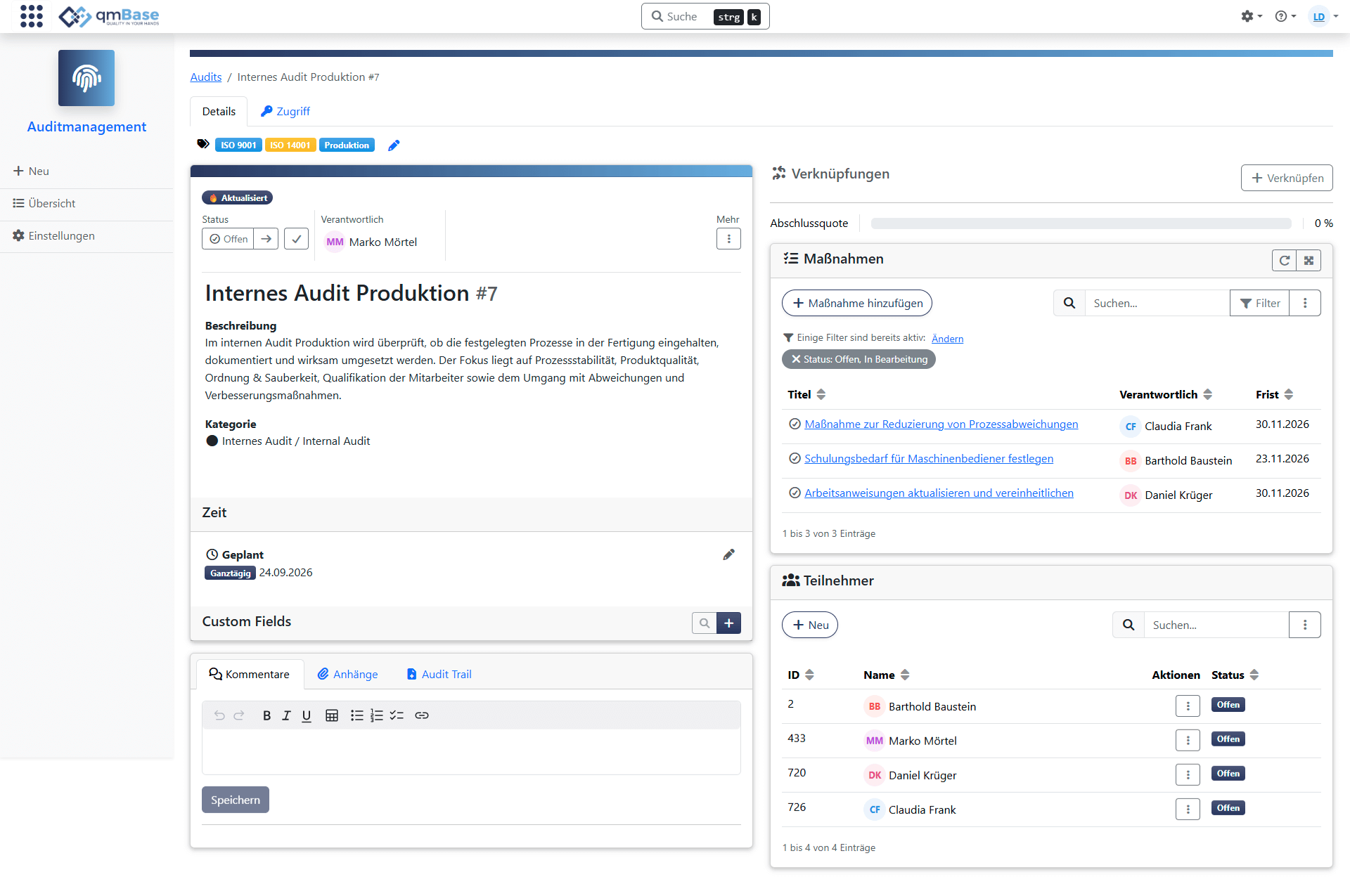
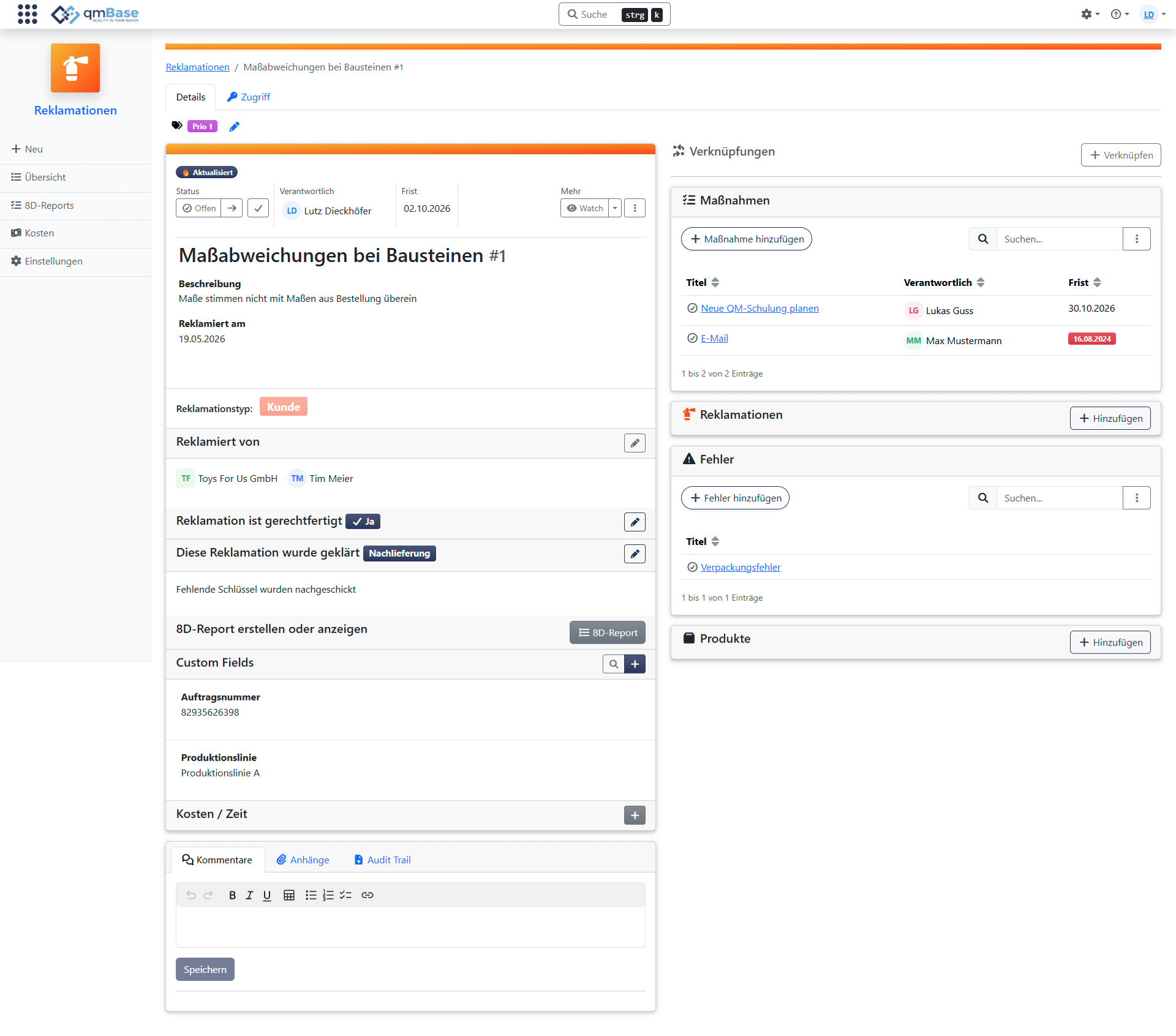
Whether a deviation is found in an audit or through a complaint, qmBase keeps causes, decisions and evidence attached to the record.
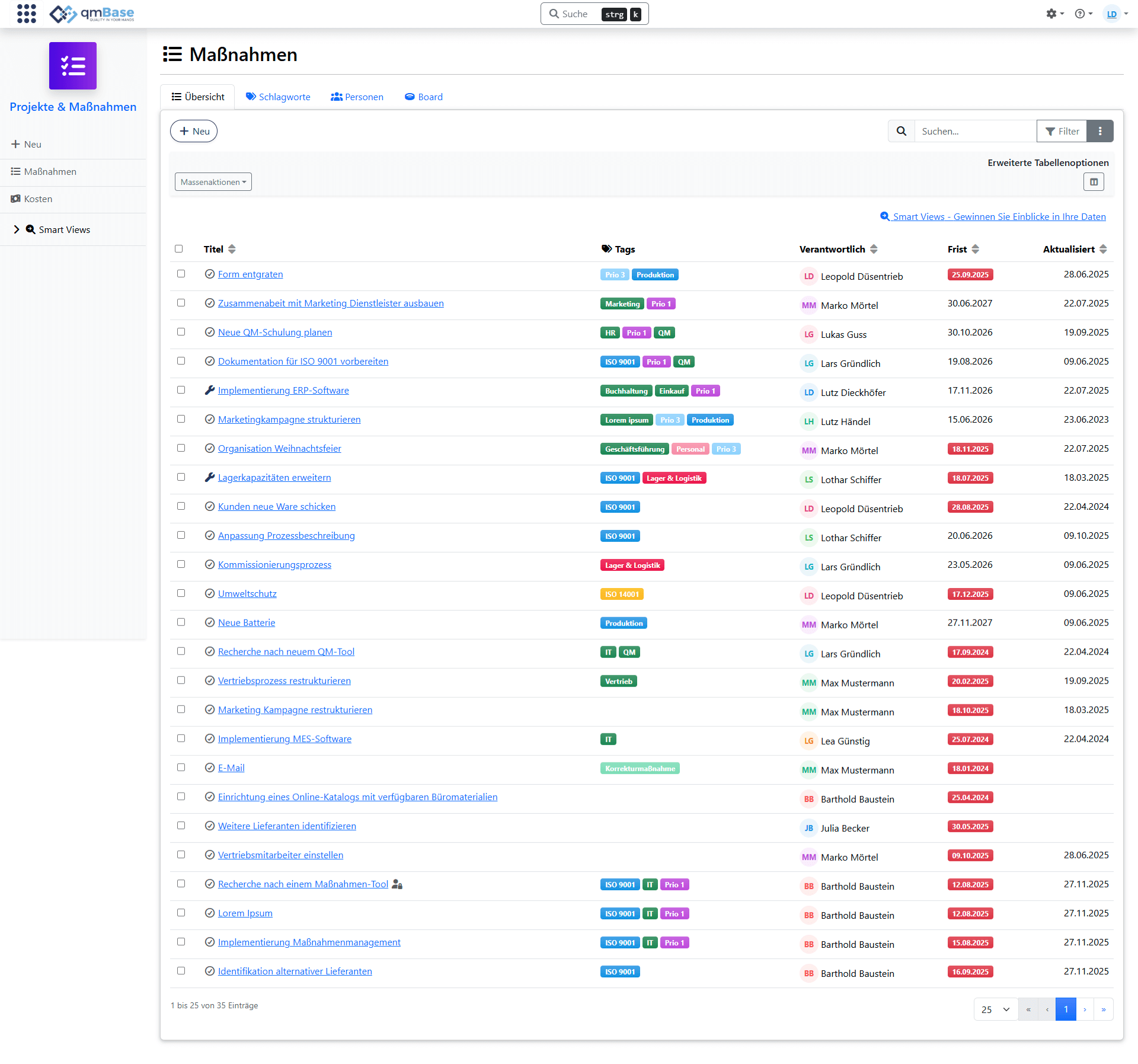
Turn findings into concrete actions with owners and deadlines. Every step remains traceable from the issue to an effective improvement.
Understand deviations in context. Implement improvements consistently.
Audit
Status
Owner
Description
The internal production audit checks whether defined manufacturing processes are followed, documented and implemented effectively.
Complaint
Status
Owner
Due date
Jun. 30
Issue description
During the customer's incoming goods inspection, a dimensional deviation was found on housing module A-42. Batch 26-041 with 18 parts is affected.
Action
Status
Owner
Due
Oct. 31
Description
The work instruction for quality inspection is updated to match the current production process. Inspection steps, responsibilities and required evidence are defined clearly and then published.
03 Training & qualifications
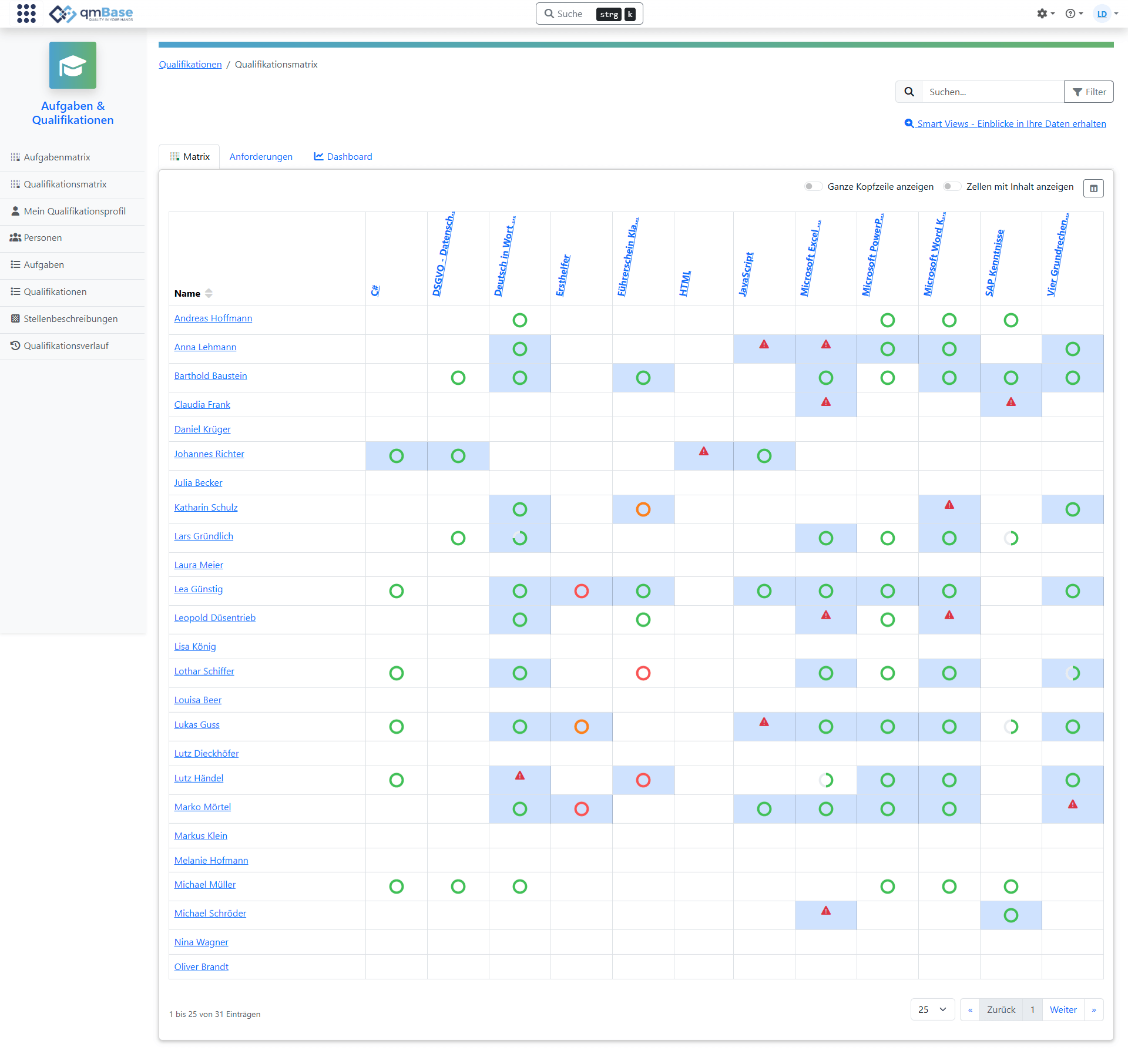
Manage employee qualifications, training and instruction centrally and transparently with qmBase.
The qualification matrix shows who meets which requirements and where action is needed. Plan and document training centrally, including attendance and evidence.
Provide reliable qualification evidence.
Build skills systematically.
Qualifications
| Name | Forklift licence | First aider | Machine instruction | Occupational safety | Quality inspection |
|---|---|---|---|---|---|
| Andreas Hoffmann | |||||
| Anna Lehmann | |||||
| Barthold Baustein | |||||
| Claudia Frank | |||||
| Daniel Krüger |
Training
Training | Planned | ||
|---|---|---|---|
ISO 9001 fundamentals | Quality management | LGLars Gründlich | 12 Nov 2026 |
Internal auditors | Audit | FBFelix Brandt | 19 Nov 2026 |
Occupational safety instruction | Mandatory training | DKDaniel Krüger | 2 Dec 2026 |
Inspection equipment management | Production | LBLouisa Beer | 10 Dec 2026 |
Handling complaints reliably | Quality | BBBarthold Baustein | 15 Jan 2027 |
First aid refresher | Mandatory training | MMMara Müller | 28 Jan 2027 |
04 Risks & objectives
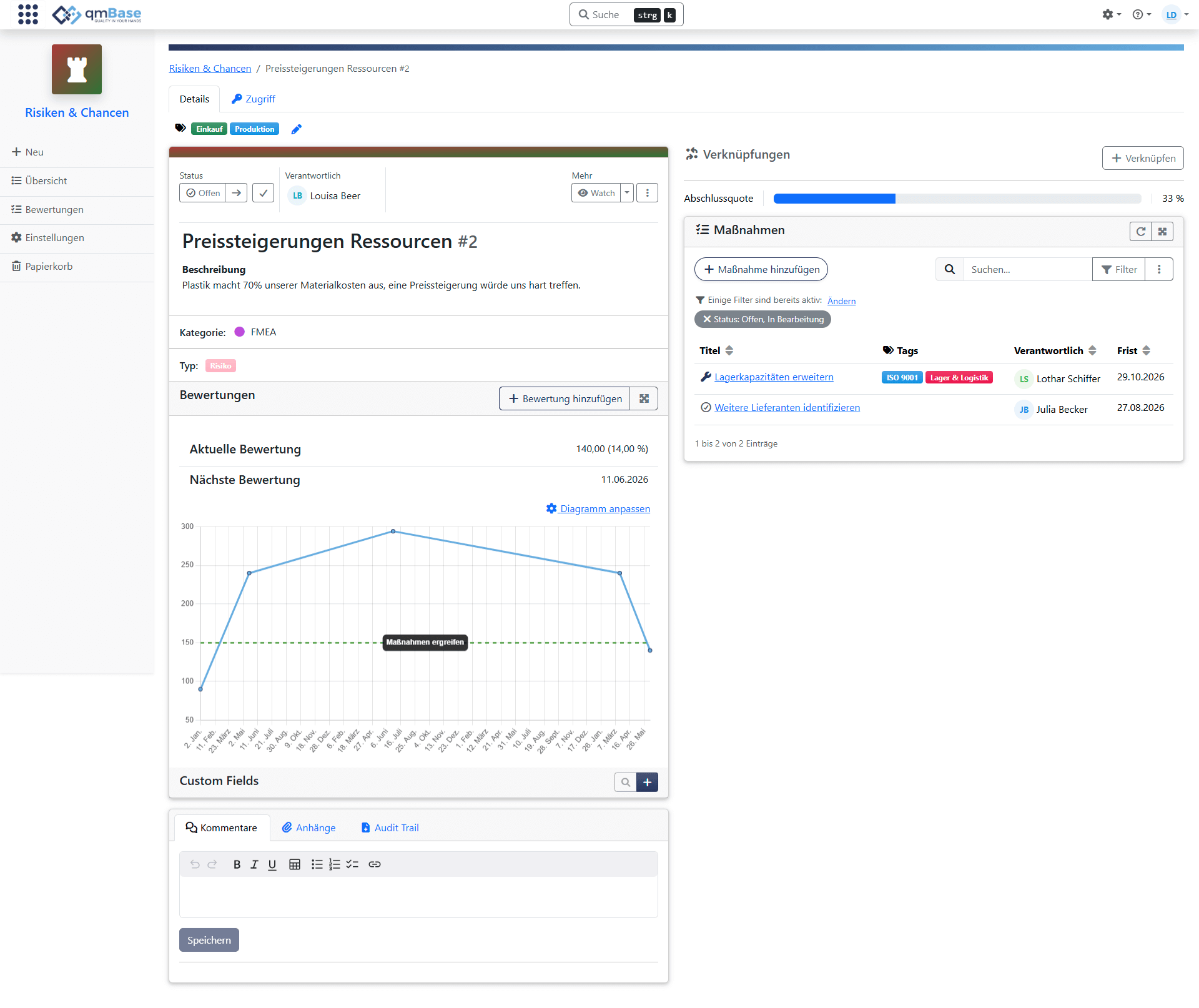
Assess risks systematically, define thresholds and identify where action is needed at an early stage.
Use measurable objectives, indicators and regular reviews to track developments and make progress visible.
Identify risks early.
Achieve measurable objectives.
Experience it yourself
Experience in a personal demo how easily you can organize your quality management tasks with qmBase. Or explore the software on your own with your free trial system.
Document Management
3 acknowledgements pending
Training & Qualifications
1 qualification expires soon
Projects & Actions
2 open actions

qmBase Story 05
"... how happy I always was when he asked: 'Where is the documented information for that?'"
"You really enjoyed that audit."
"Silly, I know."
Less search. More confidence.
Quality management with structure
qmBase is a modular system for your quality management. Each app solves a specific task. Together, they form an integrated system - from documents to audits, actions, risks, goals, training, and claims.
Choose what you need
Use additional building blocks for master data, collaboration, organization, and transparency - exactly where your quality management needs them. All building blocks use the same information structure and work seamlessly together.
Collect improvement ideas and move valuable suggestions into structured work.
Define quality objectives, assign ownership and track progress transparently.
Coordinate absences without losing sight of responsibilities and handovers.
System foundation
Roles, permissions and responsibilities are managed consistently.
Workflows connect tasks, documents, findings and follow-ups.
Notifications keep owners informed about relevant changes.
Reports and overviews make status, progress and risks visible.
Adaptable to your needs
Adapt qmBase to the way your company works with custom fields, flexible access rights and automated workflows.
01 Access rights
Define who can view, edit or approve information for individual people as well as entire groups.
02 Custom fields
Add custom fields to your apps, such as selections, checklists, text, numbers or dates. This allows you to capture exactly the information that matters to your company.
03 Automations
Define how qmBase responds to specific events. For example, when an action is tagged as CAPA, an additional required field for the effectiveness review appears automatically.
See how documents, audits, actions, risks, and other QM processes work together in one shared system.